Model-View-ViewModel: Structuring UI Code
Your user interface started off clean, but now the code is a rat’s nest of special cases, and no two parts of the UI can agree on what the data they should be displaying is?
Maybe you need MVVM, or Model-View-Viewmodel.
MVVM is an application design pattern often used in user‑interface programming. It provides a structure for organising applications that is particularly useful when multiple views need access to the same underlying data.
MVVM defines the following components:
- Model
Provides access to the underlying data that should be displayed. This can be a direct reference to the data, or mediated by a data‑access‑layer (e.g. an ORM).
- View
Responsible for actually drawing the contents onto the screen. It displays a representation of the Model, receives user-input, and forwards the handling of these events to the ViewModel.
- View Model
The ViewModel provides an interface to access and mutate the Model.
The Problem - Multiple Views bind to the same Model
Imagine an application in which we need to display a Person in multiple places.
In a naive approach, where each View directly references the Model, there is no easy mechanism for a View to notify other Views of the same Model that it changed.
Consider a TUI application (in this example, written with textual), that displays the same Person in two different PersonView widgets.
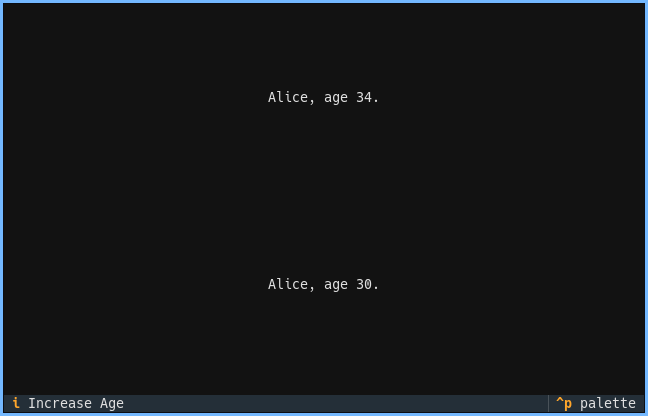
When pressing i (a keybind registered on the PersonView), the focused PersonView is updated, but the other one is not. The data is out-of-sync: one view shows Alice, age 34, and the other shows Alice, age 30.
#!/usr/bin/env -S uv run
# /// script
# dependencies = ["textual"]
# ///

from dataclasses import dataclass
from textual.app import App, ComposeResult
from textual.widgets import Static, Footer
from textual.binding import Binding


@dataclass
class Person:
    name: str
    age: int


class PersonView(Static):
    BINDINGS = [Binding("i", "increase_age", "Increase Age")]
    can_focus = True

    def __init__(self, person: Person):
        super().__init__()

        self.person = person
        self.update()

    def update(self) -> None:
        super().update(f"{self.person.name}, age {self.person.age}.")

    # Called when `i` is pressed, must manually update the view.
    # Does not have a mechanism to notify other views of the change.
    def action_increase_age(self):
        self.person.age += 1
        self.update()


class PersonApp(App):
    CSS = """
    PersonView {
        text-align: center;
        content-align: center middle;
        height: 1fr;
    }
    """

    # Creates two ``PersonView`` over the same ``Person`` instance
    def compose(self) -> ComposeResult:
        person = Person(name="Alice", age=30)
        yield PersonView(person)
        yield PersonView(person)
        yield Footer()


if __name__ == "__main__":
    app = PersonApp()
    app.run()
A PySide application that displays the same Person object in two different PersonView objects.
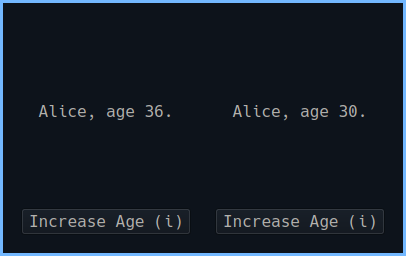
When the increase_button on one PersonView is pressed, the age on the underlying Person object is increased, but there is no mechanism to notify the other view. The age shown there never changes.
#!/usr/bin/env -S uv run
# /// script
# dependencies = ["PySide6"]
# ///

from dataclasses import dataclass
from PySide6.QtWidgets import (
    QApplication,
    QMainWindow,
    QWidget,
    QVBoxLayout,
    QHBoxLayout,
    QLabel,
    QPushButton,
)
from PySide6.QtCore import Qt
import sys


@dataclass
class Person:
    name: str
    age: int


class PersonView(QWidget):
    def __init__(self, person: Person):
        super().__init__()
        self.person = person

        layout = QVBoxLayout()

        self.label = QLabel(
            f"{self.person.name}, age {self.person.age}."
        )
        self.label.setAlignment(Qt.AlignmentFlag.AlignCenter)
        layout.addWidget(self.label)

        increase_button = QPushButton("Increase Age")
        increase_button.clicked.connect(self.increase_age)
        layout.addWidget(increase_button)

        self.setLayout(layout)

    def increase_age(self):
        self.person.age += 1
        # Only this view updates - the other view won't!
        self.update_display()

    def update_display(self):
        # Must manually update the view
        self.label.setText(
            f"{self.person.name}, age {self.person.age}."
        )


class PersonApp(QMainWindow):
    def __init__(self):
        super().__init__()
        self.setWindowTitle("Person Model-View Example")

        self.person = Person(name="Alice", age=30)

        central_widget = QWidget()
        main_layout = QVBoxLayout()

        # Create two views bound to the same person
        views_layout = QHBoxLayout()
        self.view1 = PersonView(self.person)
        self.view2 = PersonView(self.person)
        views_layout.addWidget(self.view1)
        views_layout.addWidget(self.view2)

        main_layout.addLayout(views_layout)

        central_widget.setLayout(main_layout)
        self.setCentralWidget(central_widget)
        self.resize(400, 250)


if __name__ == "__main__":
    app = QApplication(sys.argv)
    window = PersonApp()
    window.show()
    sys.exit(app.exec())
If we increment the age, the widget is not automatically re-drawn. The developer must manually update the widgets each time the values change. This is error prone.
The Solution - A View binding to a ViewModel
A ViewModel can provide an interface between the Model and the View that ensures that when the Model is updated, the View reflects this change.
Textual and pyside provide slightly different mechanisms for this.
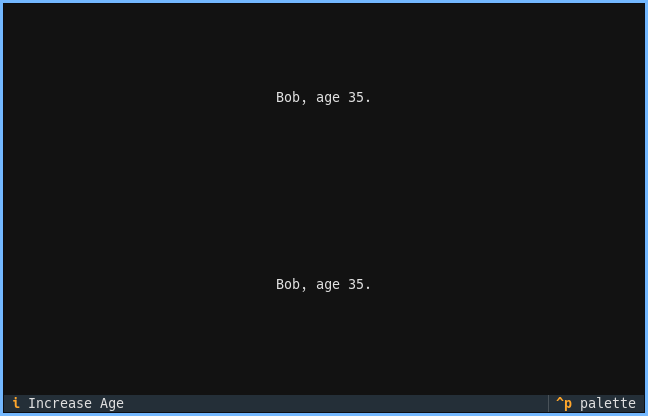
The ViewModel binds to the Model and exposes it’s attributes as reactive attributes. Other widgets can be notified when the change with self.watch(Widget, reactive_attribute, callback).
#!/usr/bin/env -S uv run
# /// script
# dependencies = ["textual"]
# ///

from dataclasses import dataclass
from textual.app import App, ComposeResult
from textual.reactive import reactive
from textual.widgets import Static, Footer
from textual.widget import Widget
from textual.binding import Binding


@dataclass
class Person:
    name: str
    age: int


class PersonViewModel(Widget):
    age: reactive[int] = reactive(0)

    def __init__(self, person: Person):
        super().__init__()
        self.person = person
        self.age = person.age

    # Called automatically when self.age changes
    def watch_age(self, new_age: int) -> None:
        self.person.age = new_age

    def increase_age(self):
        self.age += 1


class PersonDisplayView(Static):
    BINDINGS = [Binding("i", "increase_age", "Increase Age")]
    can_focus = True

    def __init__(self, view_model: PersonViewModel):
        super().__init__()

        self.view_model = view_model
        self.update()

    def update(self) -> None:
        super().update(
            f"{self.view_model.name}, age {self.view_model.age}."
        )

    # Called automatically when widget is added to the app
    def on_mount(self) -> None:
        self.watch(self.view_model, "age", self.update)

    def action_increase_age(self):
        self.view_model.increase_age()


class PersonMVVMApp(App):
    CSS = """
    PersonDisplayView {
        text-align: center;
        content-align: center middle;
        height: 1fr;
    }
    """

    def compose(self) -> ComposeResult:
        person = Person(name="Bob", age=25)
        view_model = PersonViewModel(person)
        yield PersonDisplayView(view_model)
        yield PersonDisplayView(view_model)
        yield Footer()


if __name__ == "__main__":
    app = PersonMVVMApp()
    app.run()
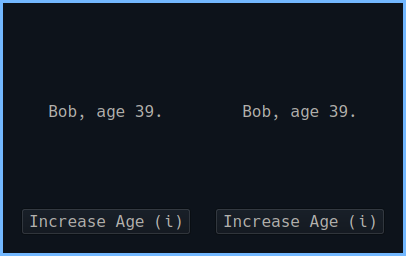
PySide uses a more verbose mechanism, that functions in conceptually the same way. The ViewModel binds to the Model and exposes it’s attributes as @Property (note the capital P).
When the Property is changed, the associated signal is triggered (via the notify= attribute of the Property).
The Views subscribe to changes by connecting to the Signal. When the Signal is triggered, the callback passed in the connect call is invoked.
#!/usr/bin/env -S uv run
# /// script
# dependencies = ["PySide6"]
# ///

from dataclasses import dataclass
from PySide6.QtWidgets import (
    QApplication,
    QMainWindow,
    QWidget,
    QVBoxLayout,
    QHBoxLayout,
    QLabel,
    QPushButton,
)
from PySide6.QtCore import Qt, QObject, Signal, Property
import sys


@dataclass
class Person:
    name: str
    age: int


class PersonViewModel(QObject):
    name_changed = Signal(str)
    age_changed = Signal(int)

    def __init__(self, person: Person):
        super().__init__()
        self.person = person

    @Property(str, notify=name_changed)
    def name(self):
        return self.person.name

    @name.setter
    def name(self, value: str):
        if self.person.name != value:
            self.person.name = value
            self.name_changed.emit(value)

    @Property(int, notify=age_changed)
    def age(self):
        return self.person.age

    @age.setter
    def age(self, value: int):
        if self.person.age != value:
            self.person.age = value
            self.age_changed.emit(value)

    def increase_age(self):
        self.age = self.person.age + 1


class PersonDisplayView(QWidget):
    def __init__(self, view_model: PersonViewModel):
        super().__init__()
        self.view_model = view_model

        layout = QVBoxLayout()

        self.label = QLabel(
            f"{self.view_model.name}, age {self.view_model.age}."
        )
        self.label.setAlignment(Qt.AlignmentFlag.AlignCenter)
        layout.addWidget(self.label)

        # Add increase age button to each view
        increase_button = QPushButton("Increase Age (i)")
        increase_button.clicked.connect(self.view_model.increase_age)
        increase_button.setShortcut("i")
        layout.addWidget(increase_button)

        self.setLayout(layout)

        # Connect to view model changes - views automatically update!
        self.view_model.name_changed.connect(self._update_display)
        self.view_model.age_changed.connect(self._update_display)

    def _update_display(self):
        self.label.setText(
            f"{self.view_model.name}, age {self.view_model.age}."
        )


class PersonMVVMApp(QMainWindow):
    def __init__(self):
        super().__init__()
        self.setWindowTitle("Person MVVM Example")

        person = Person(name="Bob", age=25)
        person_view_model = PersonViewModel(person)

        # Create two views bound to the same view model
        central_widget = QWidget()
        main_layout = QVBoxLayout()

        views_layout = QHBoxLayout()
        views_layout.addWidget(PersonDisplayView(person_view_model))
        views_layout.addWidget(PersonDisplayView(person_view_model))

        main_layout.addLayout(views_layout)

        central_widget.setLayout(main_layout)
        self.setCentralWidget(central_widget)
        self.resize(400, 250)


if __name__ == "__main__":
    app = QApplication(sys.argv)
    window = PersonMVVMApp()
    window.show()
    sys.exit(app.exec())
Now, instead of incrementing the age directly on the Model (which knows nothing about the user‑interface library we are using), we increment the age on the ViewModel, which can inform other interested parties of the change.
Our UI is now sync.